In this post:
Moving code between Databricks environments sounds simple until you're responsible for proving that the right changes reached production—and that the wrong ones didn't.
After more than 20 years working in insurance and with Sarbanes-Oxley (SOX) audit requirements, I didn't see security and change control as something to add after building a deployment pipeline. They were part of the design from the beginning.
I've designed Databricks deployment processes around different client toolsets, including Azure DevOps, GitHub, and Octopus Deploy. The CI/CD platform could change, but the questions stayed the same: Who can deploy? Who approved the change? What was tested? And can you trace what actually reached production?
The team wanted developers to build and test notebooks and jobs in development, then promote approved changes into user acceptance testing (UAT) and production without manually recreating resources in each workspace. We wanted automation, but we also wanted control. Here's how we used Databricks Declarative Automation Bundles (DABs), and the security controls around them, to get both.
Building Secure, Consistent Environments
Starting With Declarative Automation Bundles
Our first challenge was figuring out how to deploy Databricks jobs consistently across development, UAT, and production without manually recreating jobs in each workspace or maintaining different versions of the same notebook.
We decided to use Databricks Declarative Automation Bundles (DABs). They let us define jobs and pipelines in YAML and deploy them consistently from source control. Recreating jobs manually in every workspace is tedious. More importantly, we're human. We can forget a step or configure something differently. Defining resources in source control helped us avoid those inconsistencies.
We also wanted to make the configuration manageable as more developers started contributing. Instead of putting everything into one large databricks.yml file, we organized our configurations into separate folders for jobs, pipelines, and environment variables with our CI/CD pipeline definitions kept separately.

Figure 1: Example DAB project structure showing how resource YAML files, environment-specific variables, and deployment targets are organized, with CI/CD pipeline configurations maintained separately.
This made it easier for developers to find what they needed and reduced the chance of multiple people editing the same configuration file. I've seen two developers try to push changes to the same file, only for one to discover that the repository had changed. Their local copy was out of sync, and they had to reconcile the differences. If conflicts aren't resolved carefully, someone's changes can be overwritten or lost. Smaller configuration files helped reduce that risk.
We also maintained separate Databricks workspaces for Development, UAT, and Production, each with its own deployment service principal and user access controls. That gave us two things we wanted from the beginning: consistent deployments and separation between environments.
The following diagram shows how our source-controlled bundle definitions moved through the deployment pipelines into each Databricks workspace.
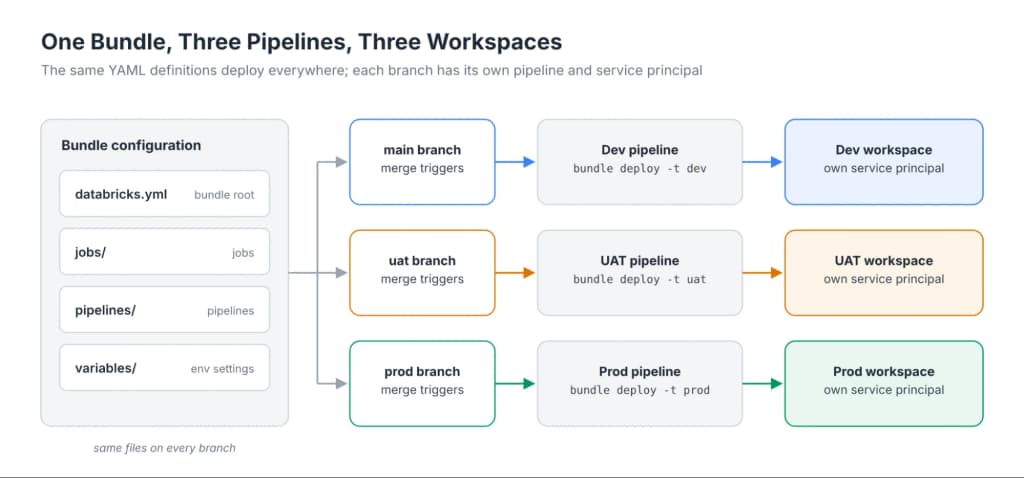
Figure 2: Architecture overview showing how DAB definitions in source control map to Dev, UAT, and Production pipelines and workspaces.
Understanding Databricks Environments
Creating separate workspaces doesn't automatically mean you've isolated your data. Each workspace provides a separate place to develop, test, and run code, but those workspaces can share the same Unity Catalog metastore, which manages catalogs, schemas, and access permissions. That means simply creating separate workspaces doesn't prevent someone working in Development from accessing Production data.
We needed to make sure our environments were separated intentionally, rather than assuming they were secure because they existed in different workspaces. We configured workspace-catalog bindings to restrict which workspaces could access our Development, UAT, and Production catalogs. We also used Unity Catalog permissions to control which users and service principals could read or modify the data. Workspace-catalog bindings restricted where catalogs could be accessed, while Unity Catalog permissions determined who was authorized to access the data.
We also needed to consider workspace permissions. Restricting access to a catalog doesn't prevent someone from accessing the workspace itself, so workspace access and data access needed to be managed separately.

Figure 3: Diagram of Unity Catalog metastore configuration separating Development, UAT, and Production workspace catalogs and permissions.
There was one additional consideration. Sometimes our data engineers needed to validate code against production raw data because development data wasn't always current, complete, or representative of what they would encounter in Production. We allowed authorized data engineers read-only access to production raw data for validation purposes. We could also audit that activity through Databricks system tables, including system.access.audit and system.query.history, to see who accessed the data and what queries were executed. This allowed us to support legitimate development and testing needs while maintaining controls and visibility into production data access.
Creating separate workspaces gave us separate places to work. Configuring the appropriate security controls established the boundaries between them.
With those boundaries established, the next challenge was making sure our code could move between environments without requiring changes to the notebooks themselves.
Keeping Environment Settings Out of the Code
We needed a way to deploy the same code across Development, UAT, and Production without hard-coding environment-specific values. For example, a notebook reading policy data in Development needed to reference the development catalog. When that same notebook moved to UAT or Production, it needed to reference the appropriate catalog for that environment.
We didn't want developers manually changing catalog names, storage paths, or other environment-specific settings every time code was promoted. The same code needed to work in every environment without modification. Otherwise, we were introducing unnecessary risk into a process we were trying to control.
Instead, we used environment-specific YAML configuration files with DABs. These allowed us to define values for each environment and pass them into our Databricks jobs as parameters, which the notebooks could read using dbutils.widgets.
If a storage path, catalog name, or another environment-specific value changed, we could update the configuration in one place rather than finding and modifying every notebook that referenced it. It also reduced the risk of human error. Developers didn't have to remember to replace development values with production values before a release.
That consistency mattered for more than convenience. In an environment with change-management and audit requirements, we needed confidence that the code tested and approved in UAT was the same code being deployed to Production, without additional manual edits along the way.
Of course, configuration alone wasn't a security control. A notebook could be configured to reference a particular catalog, but that didn't automatically grant permission to access it. The Unity Catalog permissions and workspace-catalog bindings we established still determined whether that access was allowed.
The configuration told our notebooks where to go. Our security controls determined where they were allowed to go.
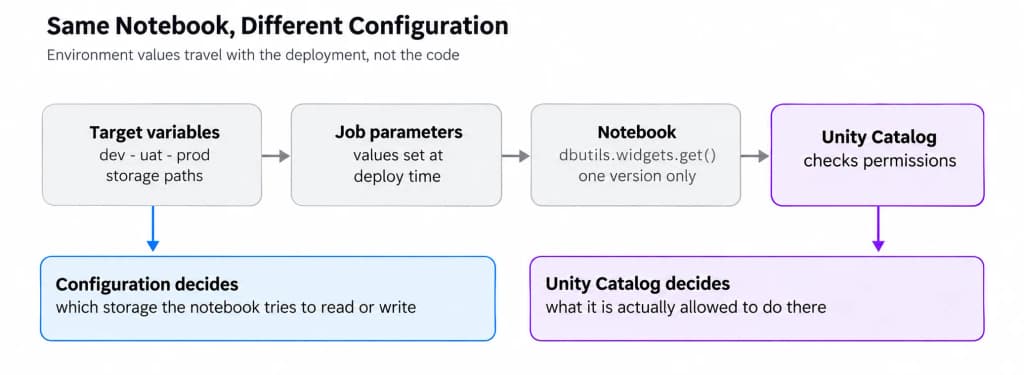
Figure 4: Flowchart illustrating how target environment variables are passed to notebook parameters while Unity Catalog enforces permissions.
Keeping Deployments Consistent and Secure
We also needed to make sure each deployment pipeline could access only its Databricks workspace. DABs gave us a consistent way to define and deploy our jobs and pipelines through source control. But consistency alone didn't prevent a deployment from targeting the wrong environment.
To address that risk, we created a separate service principal for each environment. SpDatabricksDev had access only to the development workspace. SpDatabricksUAT had access only to UAT. SpDatabricksProd had access only to Production. We configured those workspace access boundaries through the Databricks account console.
That separation mattered. If someone accidentally configured the development deployment pipeline to target Production, the development service principal wouldn't have permission to deploy to that workspace. The deployment would fail because the service principal lacked the required access.
DABs helped us deploy resources consistently. Restricting our service principals helped prevent deployment identities from accessing environments they weren't authorized to manage.
For a regulated enterprise, both pieces matter. It's not enough to know that a deployment succeeded. We also needed to control which identity could deploy, where it could deploy, and how those changes were reviewed.
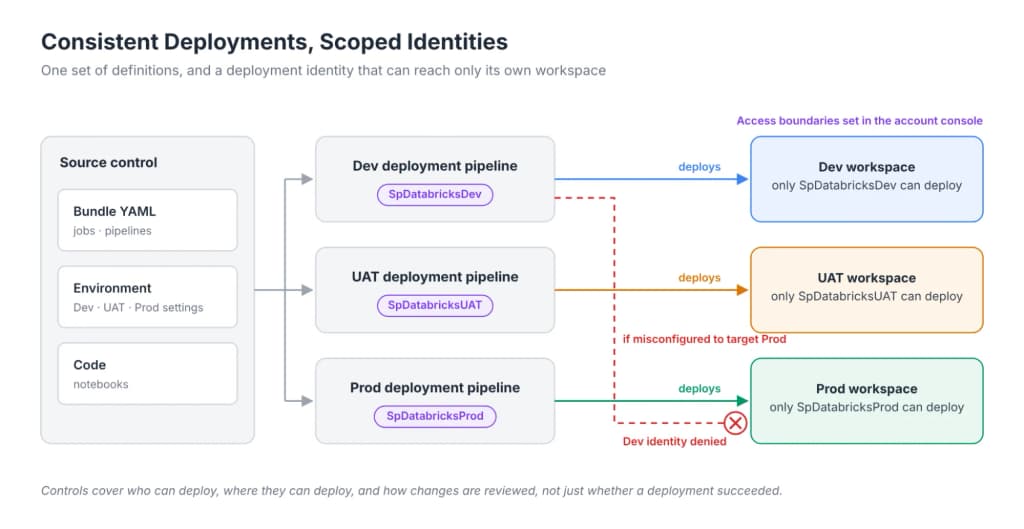
Figure 5: Diagram showing dedicated service principals per environment pipeline preventing unauthorized deployments to other workspaces.
Automation Didn't Mean Removing Approvals
Another important decision was determining where approvals belonged in the deployment process. We wanted the pipelines to handle deployments automatically once changes were approved. Merging approved changes into main triggered deployment to development and merging an approved pull request into the UAT branch triggered deployment to UAT.
Production required additional controls depending on the organization's change-management requirements. In one implementation, the production pipeline paused until the required change-management approval was received. In another, an authorized manager approved the production pull request before it could be merged. Once merged, the pipeline handled deployment.
People approved the changes. The pipeline performed the deployment.
We weren't trying to remove human judgment from the process. We were trying to eliminate unnecessary manual deployment work.
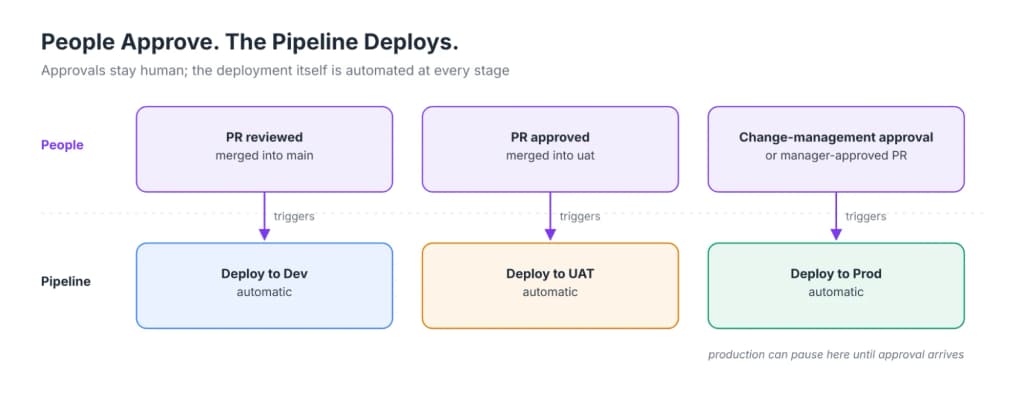
Figure 6: Overview of the approval process showing human review steps triggering automated pipeline deployments across environments.
Why We Needed a Separate UAT Environment
Development was where we built and initially tested code, but it was constantly changing as multiple developers worked. That made thorough business testing difficult. A tester could encounter an unrelated change that broke something, lose time troubleshooting, and move on to other responsibilities. Getting them back to finish testing wasn't always easy.
We created a separate UAT environment for changes ready for business validation, so testers could work in a more stable environment without being disrupted by unfinished development.
Testing in UAT meant more than a successful job run. A successful Databricks job didn't necessarily mean the data was correct. For example, if we expected 180 records from a source batch to be ingested into a bronze (raw ingestion) table and only 170 appeared, we needed to understand why. Sometimes testing meant reconciling source data against what landed in bronze. Other times, especially when developing something new, it meant comparing the results against business requirements.
When testing uncovered a problem, developers fixed and tested it in Development before promoting the correction to UAT. We didn't want developers treating UAT as another place to write and fix code. And we learned why that mattered.
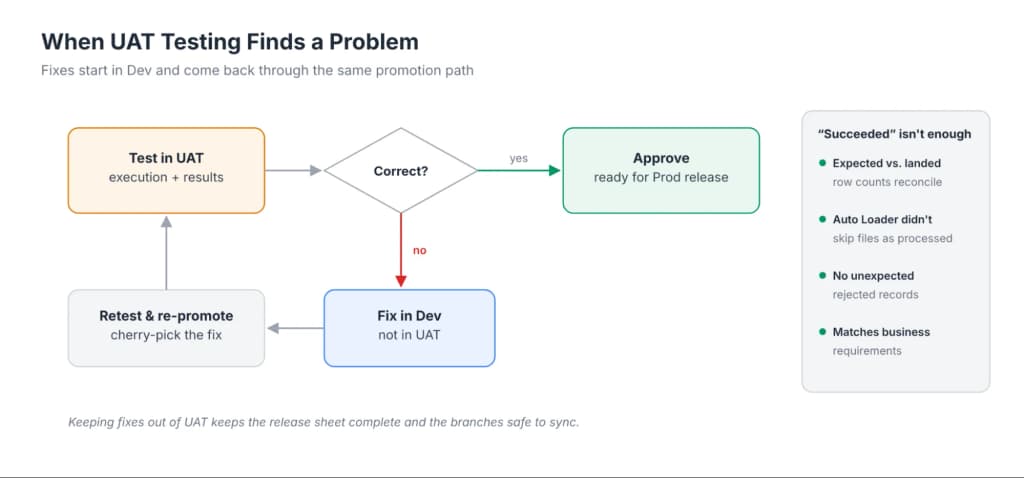
Figure 7: Feedback loop diagram demonstrating how defect fixes must originate in Development and be re-promoted to UAT rather than fixed directly in UAT.
Cherry-Picking Changes Through UAT and Production
Once we had the deployment pipelines working, we ran into a different problem. Not everyone was ready to release their code at the same time. One developer might have finished their changes and been ready for UAT, while another was still working on something that wasn't ready to be tested.
Initially, moving everything from main into UAT seemed like the simplest approach. But that meant unfinished changes could be promoted along with the completed ones. And when those changes caused problems, testing became more difficult than it needed to be. We needed a way to promote the changes that were ready without forcing everyone else to finish their work first. That's when we started using cherry-picking.
Git cherry-picking allowed us to select specific commits from one branch and apply their changes to another without bringing along everything else.
Our process started by selecting the approved commits from main and initiating a cherry-pick. As part of that process, we created a temporary release branch based on UAT. The selected commits were applied to that branch, and we opened a pull request to merge them into UAT.
Once the pull request was reviewed, approved, and merged, our CI/CD pipeline automatically deployed those changes to the UAT workspace.
After testing and approval in UAT, we followed the same process for production. We selected the approved commits from UAT and initiated a cherry-pick, creating a temporary release branch based on Prod as part of that process. We applied the selected commits to the temporary branch and opened a pull request into Prod.

Figure 8: Step-by-step workflow for cherry-picking approved commits from main to UAT and Prod via temporary release branches.
Once the required approvals were completed and the pull request was merged, the production deployment pipeline handled the deployment. This gave developers the flexibility to continue working in development while completed changes moved through testing and production releases. But it also introduced another challenge. Cherry-picking creates a new commit with a different identifier. That meant the original development commit didn't have the same SHA as its corresponding UAT or production commit. If we needed to troubleshoot a production issue or determine exactly what had been released, we couldn't simply search for the original development commit.
We needed a way to track the relationship between those commits.
Keeping Releases Traceable and Auditable
The Spreadsheet That Helped Us Manage Releases
Our solution for tracking cherry-picked commits was a release tracking spreadsheet. Nothing fancy, but it became more than a list of commits. We recorded:
- Original development SHA and the corresponding UAT and production SHAs
- Ticket number
- Developer
- Affected object
- Description
- File path
- Testing and approvals at each stage, with the initials of the people who reviewed or validated each change
Two additional columns addressed problems that could easily be overlooked during a release.
- Release Notebook: Not every release activity involved a notebook that would run as part of a scheduled job or pipeline. Sometimes we needed a one-time script to correct existing data without reloading an entire table, apply a data migration, or grant access to a Databricks object. This column alerted the person coordinating the release that an additional script might need to be executed and validated in each applicable workspace.
- Job or Pipeline – New or Changed: Deploying a notebook doesn't automatically mean that notebook will execute. If a new notebook was supposed to run as part of a job or pipeline, we needed to make sure the corresponding YAML configuration was included in the release. Otherwise, we could successfully deploy a notebook that never actually ran.
We stored the release spreadsheets in the client's SharePoint environment, keeping them independent of the source code and under the client's control. This supported version history, access management, and an independent record of release activities.
The spreadsheet also helped us support SOX audits. For the change-management controls relevant to our audits, saying that changes were reviewed and approved wasn't enough. We needed evidence showing what reached production, how it had been tested and approved, and whether it matched the authorized release. Our goal was to let an auditor select any release spreadsheet and trace it from start to finish.
The validation worked in both directions. Starting from the spreadsheet, an auditor could take the production commit SHA for each change and compare it to the repository:
- Did the production commit contain the changes listed in the release spreadsheet?
- Did the merged pull request change only those objects?
- Did the pull request have the required approvals?
Starting from the Prod branch history, they could take a commit and confirm that it appeared in the release spreadsheet. That second check mattered more than it might seem. A change that reaches the production branch without being recorded is exactly the kind of gap an audit is designed to find.
Branch protection and required pull request approvals helped protect the Prod branch history and provided evidence of how changes were reviewed before merging. The Release Notebook column mattered here too. If a one-time script corrected data or granted access in production, the auditor needed evidence that it was included in the release record, approved, and validated after execution.
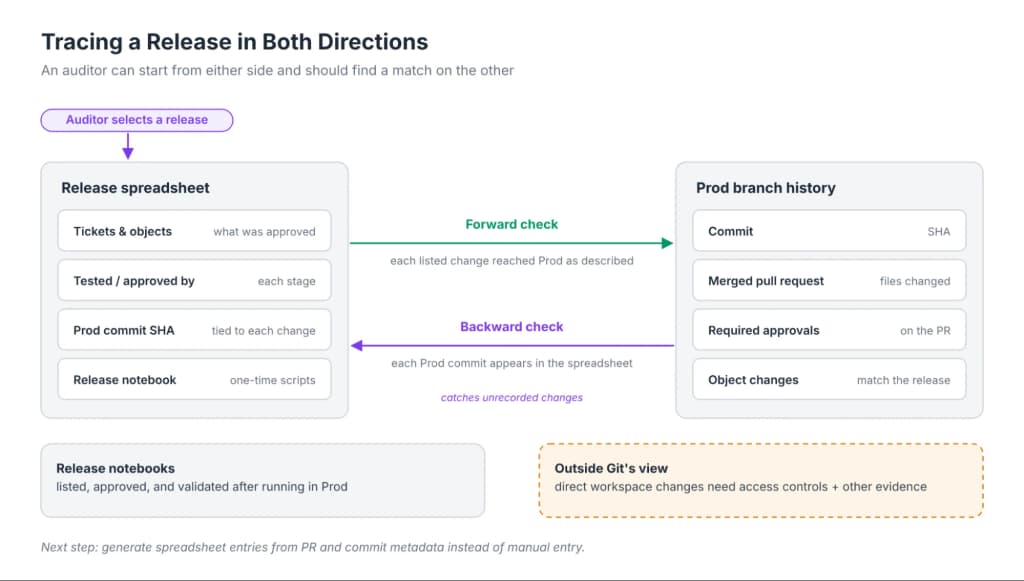
Figure 9: Diagram showing bidirectional verification between the release tracking spreadsheet and production Git commit history for audit compliance.
Of course, the spreadsheet had limitations. It was only as good as the information people entered, and comparing the Prod branch history against it was still a manual check. Git history also couldn't prove that nobody had modified a Databricks workspace directly outside the deployment process. That required appropriate access controls and additional evidence. Generating the spreadsheet entries from pull request and commit metadata is one area where I think additional automation could make the audit trail more reliable.
We Still Needed to Keep Branches Aligned
Cherry-picking solved our immediate problem of selectively promoting changes, but it wasn't a complete solution. Over time, continuously cherry-picking commits could cause our branches to drift apart.
We periodically performed full merges from main into UAT and from UAT into prod to help bring the branches back into alignment. We treated these as planned releases, with the same testing and approval requirements as any other promotion. Those merges required planning because they could also introduce development changes that hadn't previously been selected for release.
If a deployment introduced a problem, we reverted the problematic commit in the affected branch, usually UAT, but occasionally Production. The revert went through a pull request and approval process before being deployed. We then developed a hotfix in main and tested it through UAT. Once validated, we promoted both the original commit and the corrective commit together, keeping the changes and release history in sync across environments.
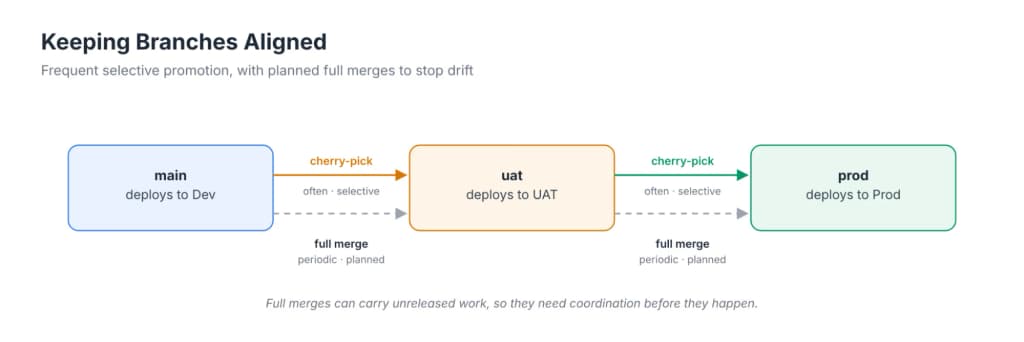
Figure 10: Diagram illustrating selective promotion via cherry-picks alongside periodic full branch merges to maintain branch alignment.
Why Following the Process Mattered
We had an incident where someone placed test code directly into UAT instead of following our normal development and promotion process. Later, during an effort to synchronize UAT with main, that code was lost.
A standard Git merge doesn't automatically erase changes from the target branch. But changes made outside the normal development and deployment process can be lost or overwritten during synchronization or redeployment, depending on how they're managed. The larger problem was that the code hadn't been properly tracked through our release process. If someone could bypass the process and make changes directly in UAT, we couldn't rely on our release tracking to tell us everything that had changed. And when something went wrong, troubleshooting became more difficult.
It reinforced why branch protection, pull request review, and consistent promotion rules mattered. A deployment pipeline can automate moving code. It can't guarantee that everyone follows the development process unless the appropriate controls are in place.
Final Thoughts
When we designed CI/CD for Databricks, security, change control, and auditability were requirements from the beginning. We also needed to make deployments easier. Declarative Automation Bundles gave us consistent, source-controlled deployments, while workspace-catalog bindings, Unity Catalog permissions, and a separate service principal for each environment kept those environments apart.
However, the biggest challenges weren't really about deploying code. They were about controlling which changes were ready, keeping environments stable, managing approvals, tracking releases, and making sure the deployed jobs actually produced the expected results. Automation alone wasn't enough.
The biggest lesson for me was that CI/CD isn't just about automating deployments—or checking a compliance box. It's about creating a process that developers can work within, testers can trust, and organizations can govern.
Automation handles the repeatable work. People remain responsible for making sure the right work gets done.